Copilot / Choosing tools
How to Auto-Save Your Meeting Notes to Teams and OneNote at Once
Automate saving notes in 2 places with Copilot
Summary
Automate Teams meeting notes into OneNote and Teams with Copilot's Power Automate, a 10-minute no-code workflow that outlasts the recording.
Before you start
The TL;DR
Step | Trigger / Action in Power Automate |
|---|---|
Get the transcript | OneDrive: When a file is created (watch the Transcripts folder) |
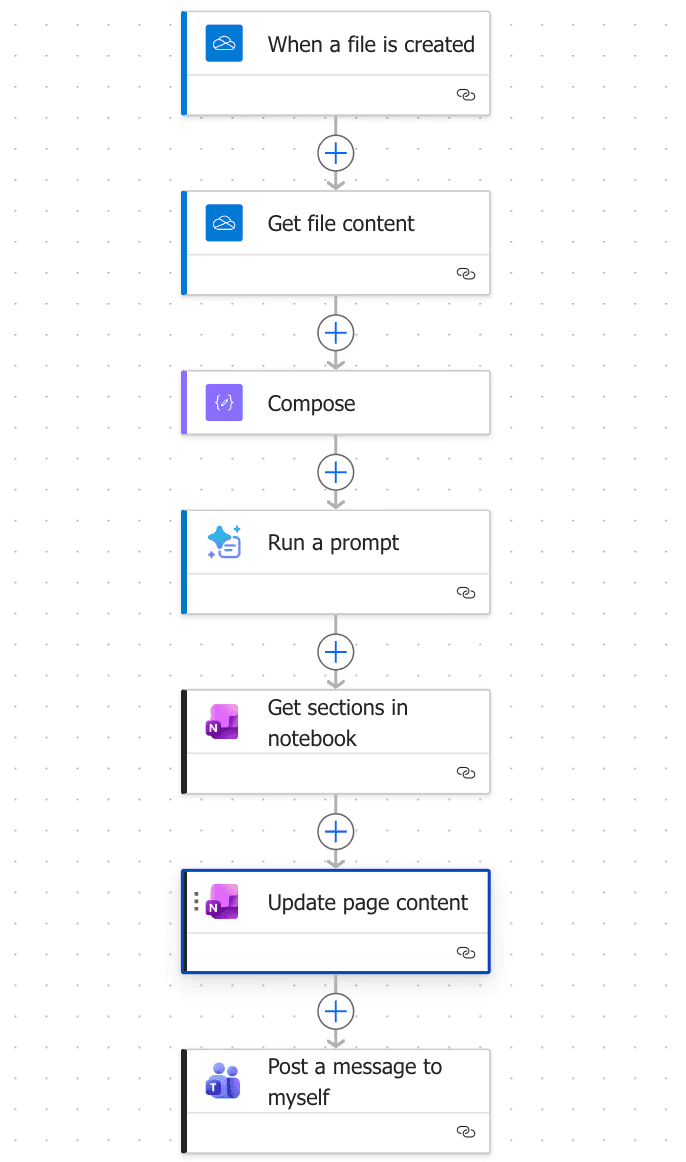
Read the file | OneDrive: Get file content → Compose |
Summarize it | Run a prompt (Claude or ChatGPT) |
Save to OneNote | OneNote: Get sections in notebook → Update page content |
Notify yourself | Teams: Post a message to yourself |
Most AI advice about fixing this assumes you have Claude or ChatGPT, but most companies actually gave you Copilot. Good news: Copilot's automation layer, Power Automate, can build custom workflows with no separate AI subscription.
It takes about 10 minutes to set up once.
Here's how to automate meeting notes being transcribed to a Teams message and a running OneNote.
Why? Meeting recordings expire after 60 days.
If the only copy of what got decided lives in a Stream recap, it's gone the day that recording ages out.
Step 1: Get the transcript out of Teams before it disappears
If you owned the meeting invite and it was recorded, open the Meeting Event and click "View Recap."
Download the transcript as a .vtt file and save it to a dedicated OneDrive folder. Call it "Transcripts" so the next step can find it.
This only works for meetings you organized; if someone else owned the invite, you won't have Recap access to it this way.
Step 2: Build the trigger in Power Automate
Go to make.powerautomate.com — this is the same automation suite from the companion no-code guide, just pointed at a more specific job.
Click "+Create" → "Skip" → Blank page
Then set the trigger to OneDrive: When a file is created, linked to your Transcripts folder.
Add the following in this order:
OneDrive: Get file content then
Compose (with Inputs set to "Body") so the workflow has the transcript text in hand.
Step 3: Have AI summarize it in your format
Add the trigger Run a prompt, choose Claude or ChatGPT, and give it a fixed instruction so every summary comes back:
"You are an executive assistant creating professional meeting notes. Analyze this meeting transcript: {{transcript}}.
Return plain text only.
Do not use markdown, tables, or numbered lists.
Keep the entire response under 10 bullet points where possible.
Be concise and remove repetitive information. If an owner or due date is not explicitly stated, use 'TBD.'"
That last line stops the summary from inventing an owner or deadline the meeting never actually settled.
Step 4: Send the summary to two places at once
Add OneNote: Get sections in notebook then
OneNote: Update page content, filling in the notebook key, section, and page ID, with the summary appended to the body.
Then add Teams: Post a message to yourself with the same summary as the text body.
Now, a OneNote page becomes your running project log and a Teams message that puts the summary somewhere you'll actually see it that day.
Caution
The summary still needs an edit before it's trusted.
AI-generated notes are a first draft of the record. Read it before you forward it, alwys
It only works for meetings you own.
No ownership, no Recap access, no transcript file to trigger on.
Transcripts disappear on their own schedule, not yours.
Build the OneDrive copy step before the next meeting you'd regret losing, not after you've already lost one.